Move from generic logins to individualized logins
Due to security concerns, all Next Search Catalog staff accounts used to access the staff interface will be moved from generic logins to individual logins during 2024 with few exceptions.
As far as the security concerns go, in Kansas, library records regarding individual library users are not considered public records and are not available for public inspection. In short, a person’s library record is considered confidential. Accessing a patron’s confidential information for anything other than normal library business is a breach of confidentialty and, in fact, a crime. In the past year we have had several instances where former library staff members have accessed the staff interface using their library’s generic login and password.
Currently Next Search Catalog uses the following types of accounts:
When this project is completed, only the BRANCHAIDE and BRANCHSELFCHECK accounts will remain. All other staff will be given an individualized login to use when accessing the staff interface.
Pre-planning by library directors
In order to move forward with this project, each library director will need to take some steps before the work can begin.
When we contact you to tell you that we will begin working on this project with your library, we will ask library directors to do the following:
Make a list of all staff at your library that need to access the staff interface in Next Search Catalog
Decide what type of account they will need - Director, Tech, Circ, or Aide
Decide what form of userid and card number you want your staff to use - for example:
you can use first initial, last name as a card number/userid - Bob Frosty would be “BFROSTY”
you can use first name, last initial - Gloria Frosty would be GLORIAF
you can use first name, ., last name - Elizabeth Frosty would be elizabeth.frosty
the choice is up to each director
Decide whether you want staff to be able to reset their own passwords
for example, LEAVENWRTH has decided that they do not want staff to reset their own passwords, therefore they use their director’s e-mail address for all staff account e-mails (this is particularly recommended if your staff does not have work-assigned e-mail addresses)
for example, NEKLS wants their staff to be able to reset their own passwords, therefore each NEKLS employee has their own e-mail address in their own account
the choice is up to each director
Once you’re done with planning, the next step is to edit the new accounts for your staff.
Dummy accounts
A set of at least 20 “Dummy accounts” has already been created for each library.
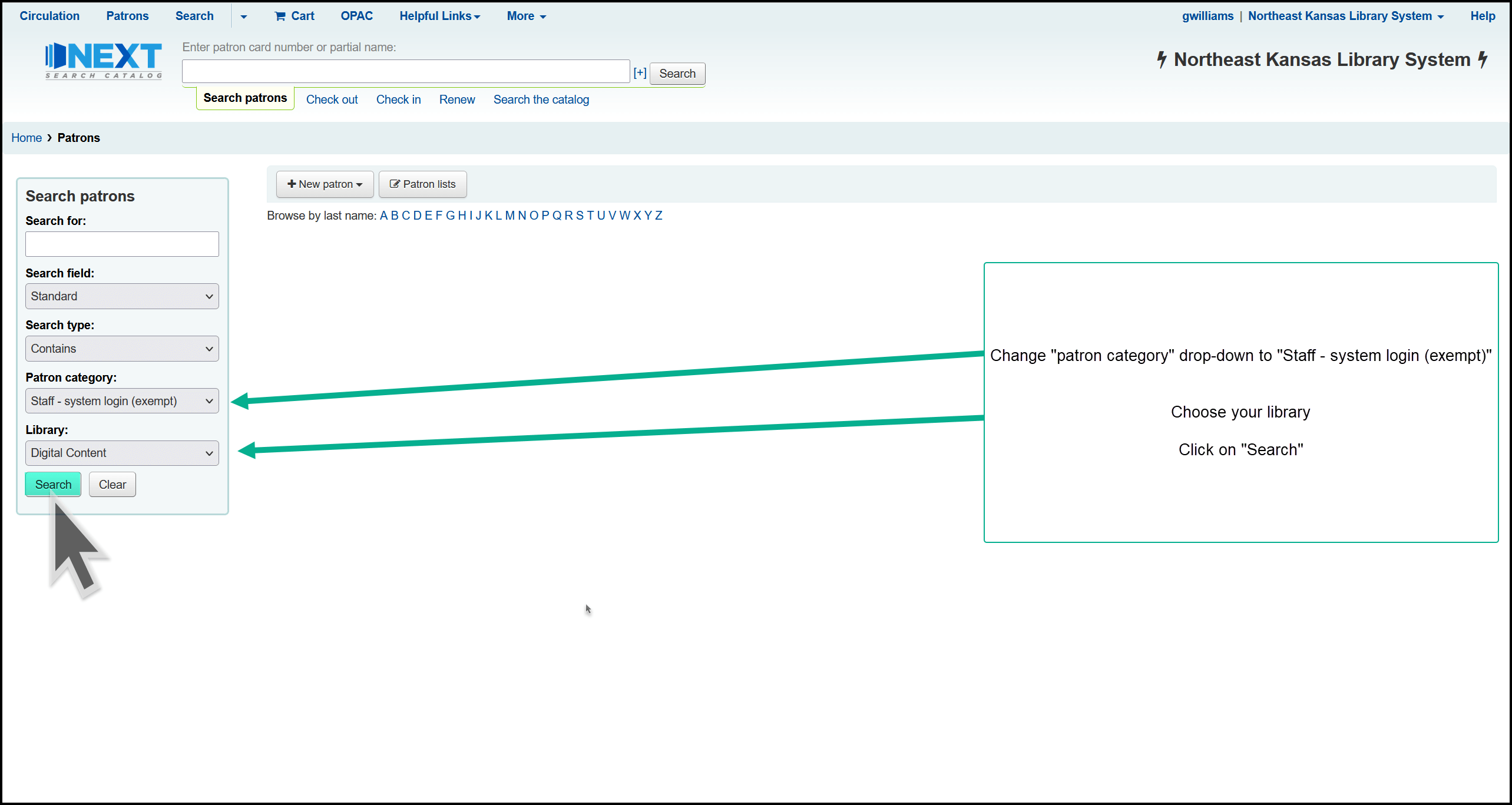
To find the dummy accounts:
Go to the Patrons menu
Change the “Patron category” drop down to “Staff - system login (exempt)”
Change the “Library” drop down to your library
Click “Search”
This will generate a list of all “Staff - system login (exempt)” accounts at your library

Edit the dummy accounts:
Click on one of the dummy accounts to select it and then edit the account as follows:
Update the staff member’s last name and first name
Update the staff member’s e-mail address based on what you decided in the pre-planning
Update the dummy account’s card number and userid to match the naming convention you decided on in the pre-planning - it’s very useful if the userid and card number match
Enter a password for the account
all passwords must be 14 characters long, must contain at least 1 capital letter, 1 small letter, and 1 numeral
passwords can include spaces, so passwords can be full sentences - here are some examples of useable passwords
It’s still rock and roll to me 4
The Philadelphia Eagles lost Superbowl 57
%r4JCcisa#h!!M24mFheC
Do not modify “Nickname/other names” or “Date of birth” fields
All other fields are optional
Submit your list of staff accounts
Once you have updated all of the dummy accounts for your library, send a list of all of the new userids and which account type that staff member will need to nexthelp@nekls.org
Coordinate with NEKLS staff
After NEKLS receives the list of userids and account types, NEKLS staff will contact you with any questions. Once any questions are resolved, NEKLS staff will set a date for the changeover. On the date of the changeover, all of you new staff accounts will work and the old staff accounts will have their permissions set to match the “Aide” accounts - i.e. they will lose the ability to do anything except check out and check in materials. 7 days after the changeover the old BRANCHTECH, BRANCHCIRC, BRANCHDIRECTOR accounts will no longer be able to access the staff interface.
FAQ
Q: Why don’t we leave things the way they are now?
A: As stated at the beginning of this document, there have been some security issues with the way things are now. In a couple of instances, security has been breached by former employees because there has been a lack of security with accounts and passwords.
Q: Won’t this be difficult for staff?
A: At libraries where this has already been implemented, reports are that it takes about 1-2 weeks for staff to become used to the change.
Q: What if I get new staff?
A: The dummy accounts will remain in place. All you have to do when you hire new staff is create an account for them, determine their account security type (Director, Technical services, Circulation, Aide, or Self-checkout), and then pass that information along to nexthelp@nekls.org. This is actually easier for NEKLS staff than the old method of creating a new staff account.
Q: I’ve made lists using our BRANCHTECH account. What will happen to those lists?
A: NEKLS staff will run report to determine which existing “Staff - system login (exempt)” accounts own lists before deleting them. If an account has lists connected to it, we will set the security permissions on that account to “Aide.” This will allow that account an extremely limited set of permissions.
Q: What if someone forgets their password?
A: All “Director” type accounts currently have the ability to reset passwords for staff. Additionally, if you add the staff member’s e-mail address to their new staff account, they will be able to use the built-in “Forgot your password” function in Next Search Catalog. Additionally, you can also call NEKLS and ask for help at any time. Just be aware that NEKLS Staff cannot reset a password back to what it used to be - you will be receiving a completely new password if you ask us for help.
Q: What if somebody quits?
A: If a staff member quits, delete their staff login account. That will immediately remove their access to the staff interface.
Q: How come we didn’t do this in the past?
A: Changes in Koha have made it easier to implement this security feature. Koha now has the ability to set passowrd requirements at a higher security level for staff than for other borrowers. Additionally there is a new plugin that makes it easier to batch-manage staff user settings.